Is this related to the other message you posted?
Not particularly. Just install observation I thought I’d mention.
Hi new to the course and really liking it so far, great for less advanced people like me as well!
However, I am getting a very annoying error that I just cannot get around. I’ve searched this chat and the web in general, but nothing seems to work. Could you @jayair please have a look?
Could not freeze /Users/X/notes-app-api/get.js: Cannot read property 'hash' of undefined

ERROR in /Users/X/notes-app-api/libs/handler-lib.js

Module Error (from /Users/X/notes-app-api/node_modules/eslint-loader/index.js):

/Users/X/notes-app-api/libs/handler-lib.js

12:1 error Trailing spaces not allowed no-trailing-spaces

**✖ 1 problem (1 error, 0 warnings)**

**1 error and 0 warnings potentially fixable with the `--fix` option.**

 @ /Users/X/notes-app-api/get.js 2:0-41 4:20-27


Error --------------------------------------------------
I have tried the fix of suggested by @boxabirds back in Dec '19 but with no help. Neither me nor my editor can find any trailing spaces…
Does that line number in that file not have a trailing space?
This is just an ESLint error that you can ignore if you want by adding this comment at the end of the offending line // eslint-disable-line.
Hi @jayair no it didn’t. It was an empty line that apparently had some spaces (I’m very new, didn’t realise that’s a thing). Sorry and thanks!
1 Like
When testing, I get the following error. The only thing I’ve changed in the code is my region (us-east-2).
FullAccess:~/environment/notes-app-api (master) $ serverless invoke local  --function create --path mocks/create-event.json
Serverless: DOTENV: Could not find .env file.

  Serverless Error ---------------------------------------

  Function "create" doesn't exist in this Service


  Your Environment Information ---------------------------
     Operating System:          linux
     Node Version:              10.21.0
     Framework Version:         1.76.1
     Plugin Version:            3.6.17
     SDK Version:               2.3.1
     Components Version:        2.32.0
1 Like
Make sure you didn’t miss this step: https://serverless-stack.com/chapters/load-secrets-from-env.html
Make sure your serverless.yml is pointing to the right file for the create function.
1 Like
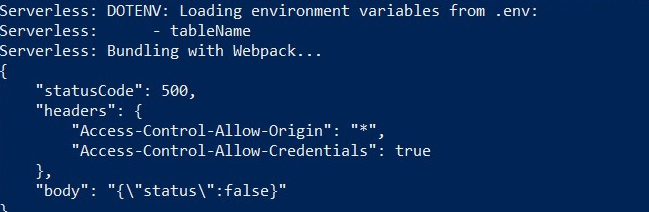
getting this issue and can’t figure out a way around it.
EDIT: my credentials were incorrect. fixed them and it fixed my issue.
1 Like
this is a little late but I had to add cred info when istantiated a new dynamo client for the mocks to work.
    import AWS from "aws-sdk";

const client = new AWS.DynamoDB.DocumentClient({
  region: "us-west-2",
  accessKeyId: process.env.AWS_ACCESS_KEY_ID,
  secretAccessKey: process.env.AWS_SECRET_ACCESS_KEY,
});
1 Like
edit: I was able to solve the problem, it was because I had duplicate projects on my machine and was running the commands in the wrong directory – sorry 
I have the same issue. I have inserted the environment as described by @toylan and I have triple checked, that my serverless.yml is pointing to the create.js file (both are inside the same root directory, this is the code of my serverless.yml:
service: notes-app-api

package:
  individually: true

plugins:
  - serverless-bundle
  - serverless-offline
  - serverless-dotenv-plugin

provider:
  name: aws
  runtime: nodejs12.x
  stage: prod
  region: us-east-1
  environment:
    tableName: notes

  iamRoleStatements:
    - Effect: Allow
      Action:
        - dynamodb:DescribeTable
        - dynamodb:Query
        - dynamodb:Scan
        - dynamodb:GetItem
        - dynamodb:PutItem
        - dynamodb:UpdateItem
        - dynamodb:DeleteItem
      Resource: "arn:aws:dynamodb:us-east-1:*:*"

functions:
  create:
    handler: create.main
    events:
      - http:
          path: notes
          method: post
          cors: true
          authorizer: aws_iam
still getting the following error message:
Serverless: DOTENV: Could not find .env file.

  Serverless Error ---------------------------------------

  Function "create" doesn't exist in this Service

  Get Support --------------------------------------------
     Docs:          docs.serverless.com
     Bugs:          github.com/serverless/serverless/issues
     Issues:        forum.serverless.com

  Your Environment Information ---------------------------
     Operating System:          darwin
     Node Version:              12.14.0
     Framework Version:         1.80.0
     Plugin Version:            3.8.0
     SDK Version:               2.3.1
     Components Version:        2.34.8
when I try to run
serverless invoke local --function create --path mocks/create-event.json
I have my code inside this public repo:
can anybody help?
@mr-ki Did you manage to figure this out?
@jayair, yes, sorry, it was a stupid mistake I made.
I had the repo checked out twice and just tried to run the wrong one. So of course all the things I tried had no effect.
I left a mark on the beginning of my previous message but this obviously just was not prominent enough.
1 Like
No worries. Glad you figured it out.
Run “aws configure” cmd and check the credential:
my aws configure
AWS Access Key ID [****************HR4E]:
AWS Secret Access Key [****************Ijg6]:
Default region name [None]:
Default output format [None]:
1 Like
I was getting the following error when trying to run the following command line from page 85 of the v5 serverless PDF
command
serverless invoke local --function create --path mocks/createevent.json
error
message: 'One or more parameter values were invalid: Missing the key userid in the item', code: 'ValidationException', time: 2020-10-29T04:29:36.088Z, requestId: 'CGM0V9RNP4T91OAHB2SF7R43MJVV4KQNSO5AEMVJF66Q9ASUAAJG', statusCode: 400, retryable: false, retryDelay: 39.536496856910006 } { "statusCode": 500, "headers": { "Access-Control-Allow-Origin": "*", "Access-Control-Allow-Credentials": true }, "body": "{\"status\":false}" }
I was able to resolve it after setting the userId and noteId to be lowercase.
const params = { TableName: process.env.tableName, Item: { userId: event.requestContext.identity.cognitoIdentityId, noteId: uuid.v1(), content: data.content, attachment: data.attachment, createdAt: Date.now() } };
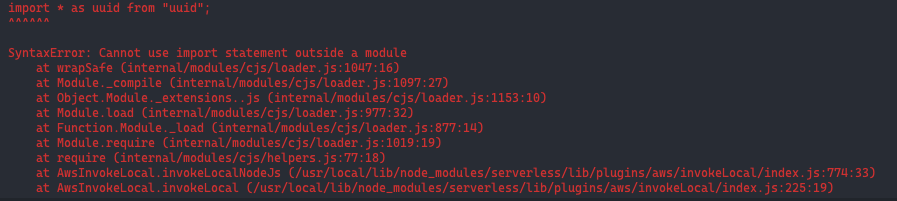
hello, when i tried to run:
serverless invoke local --function create --path mocks/create-event.json
i got this return.
For anyone having the following error when running the following command:
SLS_DEBUG=* serverless invoke local --function create --path mocks/create-event.json
ResourceNotFoundException: Requested resource not found
message: ‘Requested resource not found’,
code: ‘ResourceNotFoundException’,
Possible Solution:
Try to see if you have more than one account in your ~/.aws/credentials file, I was using my work credentials instead of my personal aws account creds.
Set the path environment variable AWS_PROFILE to tell serverless to use the desired account keys.
export AWS_PROFILE="profileName2" && export AWS_REGION=eu-west-1 SLS_DEBUG=* serverless invoke local --function create --path mocks/create-event.json
Check this resource for selecting the desired profile account when running the aws command
1 Like
Could it be that your createevent.json had it in the wrong case?
Did you get this to work? It seems like your code isn’t being transpiled?